KQED is a San Francisco-based non-profit public media organization serving Northern California. Founded in 1953, it began airing in 1954 as one of the earliest U.S. educational television stations. KQED operates two PBS television stations and the NPR radio station at 88.5 FM. Known for pioneering public television fundraising and originating its first daily news program, its radio station was the nation's most-listened-to public radio by 2011.
Since 2021, Uptech Studio has been the mobile development partner for KQED, helping to bring the range of amazing content KQED produces to Apple and Android devices.
Imagine this: You're driving home from work, stuck in traffic, and you want to catch up on the latest episode of Forum or listen to live KQED radio. You reach for your phone but wait, that's not safe. You fumble with Bluetooth audio, lose your place, and miss the story you wanted to hear.
This is the problem we set out to solve when we decided to bring KQED directly into your car's dashboard through Apple CarPlay.
For those unfamiliar, Apple CarPlay transforms your car's built-in display into a driver-friendly interface that mirrors select apps from your iPhone. Instead of glancing at your phone or navigating complex menus, you can access your favorite content through your car's touchscreen, steering wheel controls, or even Siri, all designed to keep your eyes on the road and hands on the wheel.
This is not your typical CarPlay implementation discussion. The KQED mobile app is built using 100% Flutter which brought its own set of challenges to the table. We adore Flutter for its cross-platform support and ease of use. Flutter has enabled us to move fast and ship a high quality app that is the gold standard amongst Public Radio organizations. For CarPlay to be successful, CarPlay and Flutter had to work together to form a seamless experience.
This is the story of how we brought KQED's award-winning journalism, podcasts, and live radio programming into the car dashboards of thousands of vehicles across California and beyond.
First a plug: make sure to download the KQED iOS App.
Our primary goal was simple but profound: meet people where they are.
Many listeners consume KQED content during their commute. According to listener surveys, the car is one of the top three places people engage with public radio. Before building CarPlay support, accessing the app while driving meant either:
We wanted to create an experience that felt natural and safe, as intuitive as turning on your car radio, but with all the power of on-demand digital content at your fingertips.
From a product perspective, we had several key objectives:
1. Seamless Content Discovery We wanted listeners to easily access three types of content:
2. One-Tap Playback The driving environment demands simplicity. Every interaction needed to be accomplishable with a single tap or voice command. No scrolling through endless menus, no complex navigation trees.
3. Smart Context Awareness The app needed to know what's currently playing on live radio and surface the most recent podcast episodes without requiring the driver to search or hunt for content.
4. Future-Proof Foundation While we started with core features, we wanted to build a framework that would let us add new capabilities over time based on listener feedback and usage patterns.
5. App & CarPlay Synchronization Anything that happened on CarPlay should update on the App and vise-versa. If a passenger used the mobile app to switch the listening experience to the latest episode of Bay Curious, it should automatically start playing on CarPlay.
Every product initiative begins with some assumptions. Here were ours:
Note: Some of these assumptions proved accurate, while others required us to adapt our approach.
Building for CarPlay presented unique challenges we hadn't anticipated from our Flutter development experience.
In the mobile app experience, we can show rich program descriptions, beautiful imagery, scrollable content, and complex navigation. CarPlay, by design, strips a lot of that away. Apple restricts how much text you can display, how deep your navigation can go, and what interactive elements you can include.
The problem: How do you represent KQED's diverse content catalog of live radio, daily news, talk shows, investigative podcasts, arts programs in a simple way that drivers can safely navigate?
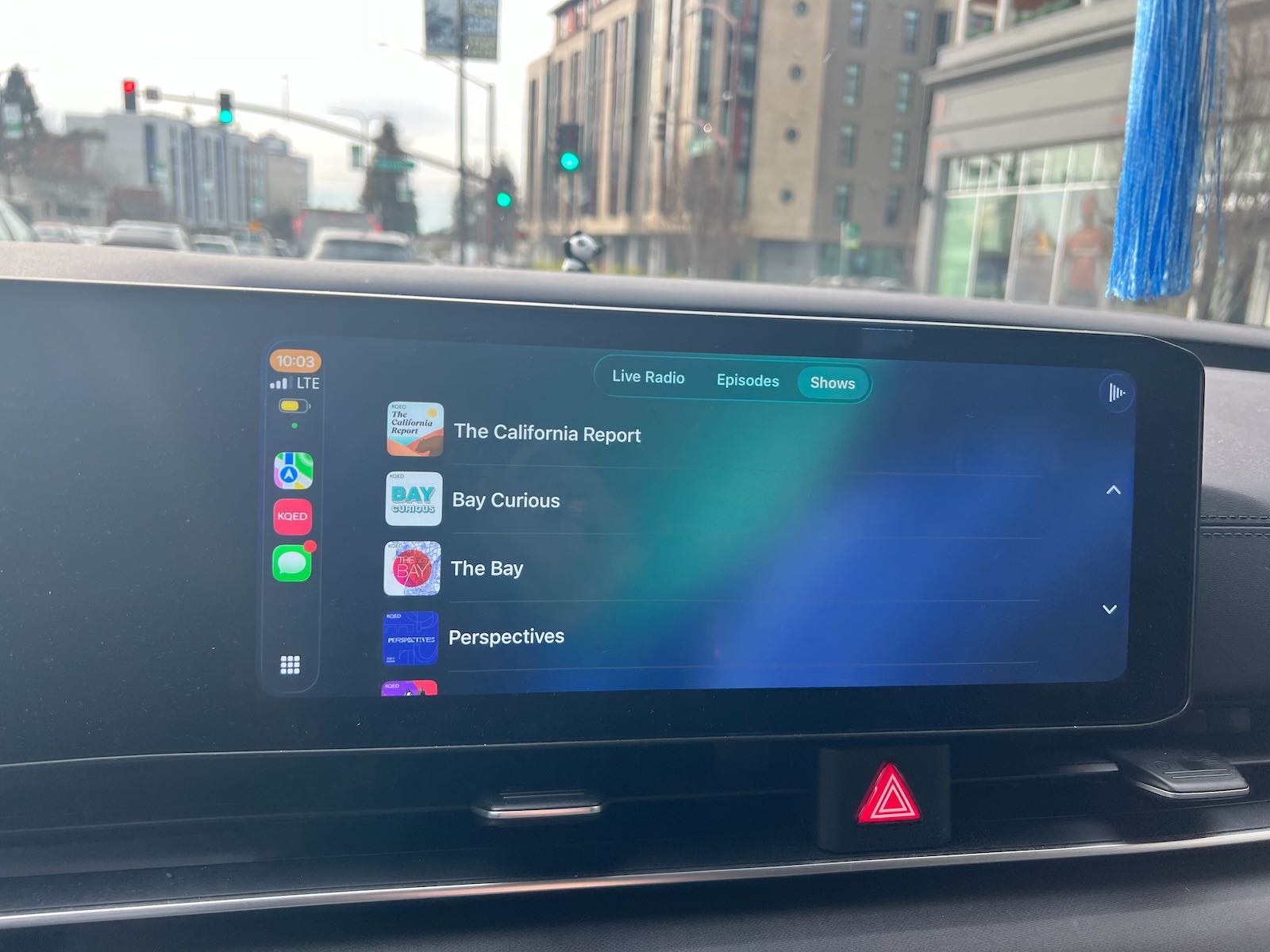
Our approach: We organized content into three clear tabs:
This structure meant that whether someone wanted to jump right into live radio or catch up on a specific podcast show, they were never more than two taps away from listening.
Our mobile app stays updated with what's currently playing on KQED 88.5, shows timely content recommendations, and refreshes based on user behavior. But in CarPlay, we couldn't assume a constant data connection or that the app would always be in an active state.
The problem: How do we keep the CarPlay interface current when someone might connect their phone to their car once a week, or when they drive through areas with poor cell coverage?
Our approach: We implemented a smart syncing system that:
This meant that when you connect your phone, you see what's actually playing right now, not what was playing yesterday.
We use feature flags (or toggles) that let us turn features on or off for testing, support phased rollouts, or run A/B experiments. But CarPlay doesn't allow for complex UI updates or sudden interface changes while someone is driving.
The problem: How do we maintain our agile development approach and testing flexibility while respecting CarPlay's stability requirements?
Our approach: We built a feature flag system that controls which tabs appear in CarPlay:
This gave us the flexibility to test different configurations with small user groups before rolling out to everyone, while ensuring that changes only happened when someone first connected to CarPlay, not mid-drive.
One of our most head-scratching bugs involved a simple loading spinner. When someone tapped on a podcast show, then tapped on an episode within that show, the loading spinner would appear and never go away, even though the audio was playing perfectly.
The problem: CarPlay's navigation system works differently than traditional mobile navigation. When you nest screens several levels deep (Show List → Individual Show → Episode), certain UI callbacks don't fire as expected.
Our observation (noted in the code): "For some reason this isn't removing the loading spinner even though it gets called. Maybe because it's nested a few templates deep?"
Our workaround: We called the completion callback explicitly, but acknowledged this was an area that needed more investigation. Sometimes in product development, you ship with known quirks and iterate based on real-world usage.
CarPlay connections aren't as simple as "connected" or "disconnected." A phone might connect to a car multiple times during a single drive (tunnel interference, Bluetooth hiccups, phone restarts). We needed to track connection state without triggering duplicate analytics events or refreshing the interface unnecessarily.
The problem: How do we distinguish between the first meaningful connection of a drive versus temporary reconnections?
Our approach: We implemented a state tracking system that only logs a "CarPlay Connected" event the first time in a session, avoiding analytics pollution and unnecessary interface refreshes.
The most important benefit is safety. According to the National Highway Traffic Safety Administration, distracted driving claimed 3,308 lives in 2022 alone. By bringing KQED into the CarPlay interface, we're reducing the temptation for listeners to interact with their phones while driving.
With CarPlay, listeners can:
CarPlay opened up new opportunities for content discovery. Before, if someone was listening to live radio in their car, they might not know about our podcast catalog. Now, they can browse shows and episodes right from their dashboard.
We surface "The Latest" daily news podcast prominently, introducing listeners who might only know KQED as a radio station to our on-demand journalism.
Early metrics suggest that CarPlay users show different engagement patterns than mobile-only users:
As a public media organization, KQED's mission is to inform, inspire, and involve the communities they serve. CarPlay helps fulfill that mission by making quality journalism and storytelling accessible in one of the places people spend significant time: their cars.
During breaking news events, commuters can now stay informed with live coverage. During long drives, they can dive into investigative podcasts. And during school drop-offs, they can catch five-minute news updates from The Latest.
We built our CarPlay integration using Flutter, a cross-platform app framework that allows us to maintain a single codebase for iOS and Android. We utilized the flutter_carplay plugin, which bridges Flutter's Dart language with Apple's native CarPlay APIs.
At the time of building the CarPlay feature, the flutter_carplay plugin did not do everything we needed it to so we forked the plugin code and updated the package as needed. Since then they have added more functionality, including support for Android Auto. We do not use the Android Auto features of this plugin because one of our audio packages Audio Service supports Android Auto. We’ll talk about this in-depth on the Android Auto version of this blog which is coming soon.
Our implementation follows a simple but effective pattern:
1. Template-Based UI. CarPlay uses predefined templates. We chose:
2. State Management. We use Riverpod to:
3. Dynamic Content Loading. The interface listens to several data sources:
When any of these change, the CarPlay interface automatically rebuilds with fresh content.
Here's what happens when someone connects their iPhone to their car:
When someone taps an item:
One of the most valuable lessons was that constraints breed creativity. CarPlay's restrictions of limited text, simple navigation and restricted UI elements forced us to make hard decisions about what matters most. This made the experience better, not worse.
Our mobile app has dozens of features. CarPlay has three tabs. And for the driving use case, those three tabs are exactly what's needed.
Apple's CarPlay Human Interface Guidelines initially felt restrictive. Why can't we show album artwork larger? Why can't we have custom buttons? Why is navigation so limited?
Then we drove with the app. And it made perfect sense. Every guideline is designed around one principle: keep the driver's attention on the road. Once we embraced that principle, our design decisions became obvious.
We expected CarPlay users to primarily listen to live radio, our "lean back" experience. The data showed strong engagement with podcast episodes and show browsing. People were using their drives to actively explore our content catalog, not just passively consume what was on air.
This insight is now influencing how we think about content curation and recommendations for future updates.
We launched with a minimum viable product: live radio, The Latest, and podcast access. Based on usage patterns and feedback, we've been able to iterate with confidence, knowing the foundation was solid.
Feature flags gave us the flexibility to test changes with small groups before rolling out to everyone, this is crucial when you're building for a safety-critical environment.
Our CarPlay journey is just beginning. Here's what we're exploring for future iterations:
If your team is considering adding CarPlay support, here are our recommendations:
Start Simple: Don't try to replicate your entire mobile app. Focus on the core use case that makes sense while driving.
Respect the Context: Driving is fundamentally different from sitting on a couch with your phone. Design for glanceability and one-tap actions.
Test in Real Cars: The simulator is useful, but nothing beats real-world testing in actual vehicles with different screen sizes, connectivity strengths, and driving conditions.
Use Feature Flags: Build flexibility into your implementation so you can iterate safely.
Talk to Your Users: Our best insights came from listening to people who actually used CarPlay during their commutes.
Be Patient with Platform Limitations: Some things you want to do simply aren't possible. Work with the constraints rather than fighting them.
Building CarPlay support for the KQED app wasn't about checking a feature box or keeping up with competitors. It was about meeting the mission: bringing quality journalism, storytelling, and information to people where they are.
Every product decision, every technical challenge, and every line of code was in service of one goal: making it effortless and safe for listeners to access KQED while driving.
The result is an experience that feels natural, stays out of the way, and lets the content shine. When someone connects their phone and KQED appears on their dashboard, they don't think about the technology. They just tap "Live Radio" and listen.
And that, ultimately, is the mark of good product design: becoming invisible so the experience can be everything.
The KQED mobile app with CarPlay support is available on iOS devices. To use CarPlay, you'll need an iPhone and a compatible vehicle or aftermarket CarPlay system.

