

You’ve all heard about the classic build vs. buy dilemma when it comes to software? We’re actually finding that the hybrid works pretty well. That’s not just what we’re finding for our clients, but based on our experience with the software tools we use to operate our own business.
As a consulting firm, we rely on time tracking and invoicing software to help run our business. Like many companies, when we first started, we managed this entirely with spreadsheets. But as we grew, we knew we needed a purpose-built tool, so about 6 years ago we adopted Harvest because it seemed perfectly suited for customers like us – a small consultancy that needed to track time and bill against a variety of projects.
Harvest served us well for many years (and along the way, we adopted their companion app, Forecast to help with allocation planning). About a year ago, Bending Spoons bought Harvest and it became clear from their new pricing strategy that they planned to shift the product focus to enterprise customers. As a relatively small company, that put us in a tight spot. Harvest was already expensive and we were facing a 600%+ price increase. We don’t need enterprise tools (and more importantly, can’t afford enterprise pricing), but we do need a quality solution.
So Adam did some research and found a relatively new product called Keito. The Keito team seems to understand us as a customer: a small business that wants a quality product but can’t afford to pay thousands of dollars a month. Their pricing (a flat fee that isn’t based on number of seats or usage) is much more aligned with what works for us, and it includes all of the features of Harvest and Forecast. It was a no-brainer to switch.
We have always struggled with getting the right reports out of Harvest (and Forecast). We'd export data to spreadsheets, stitch things together by hand, and still not have clear answers to critical questions about our business, like: "how did our actuals compare to our projections?” or “how are we tracking against the budget on each engagement?"
There were some reports we wanted to share, where we’d take screenshots of Harvest reports and then crop out details that didn’t matter, overwrite amounts that needed correction, and annotate the context by hand.
Despite having all the data to answer all of our questions, the Harvest didn’t include the tools to display data in all the ways we wanted or get at all the answers we needed.
Like Harvest, Keito does an excellent job of handling the core functionality we need, but it has many of the same gaps. Rather than wait for Keito to get to these things on their own roadmap, we’ve turned to their robust API and the help of AI to build our own reporting on top of their core features.
While we could request Keito to add additional views and reports into their core functionality, we also realize that what we want to look at (and how we want to look at it) is particular to our situation and/or may not be the best even for us. We are constantly refining how we report on things and it doesn’t make sense to expect a SaaS product to read our minds or change with our whims.
This isn’t a sophisticated application with users, roles, authentication, or shared data… just a handful of local scripts that generate the reports we need as we need them.
Getting basic working versions of the reports we wanted took less than 30 minutes.
We hold a bi-weekly company-wide meeting where we discuss the business with our employees, including how the finances are doing. Looking at weekly revenue for the last couple of weeks gives everyone a good pulse on how things are going. The point isn’t to drill into the details of the profitability on a per-project basis, but to be transparent about how things are going and have honest conversations about the things that affect our business:
This one was quick – we fed Claude Code screenshots from existing reports in Harvest and Keito that are close to what we want, told it the few changes we needed and asked for it to generate an image we could easily drop into our slide template. In minutes we had exactly what we needed!
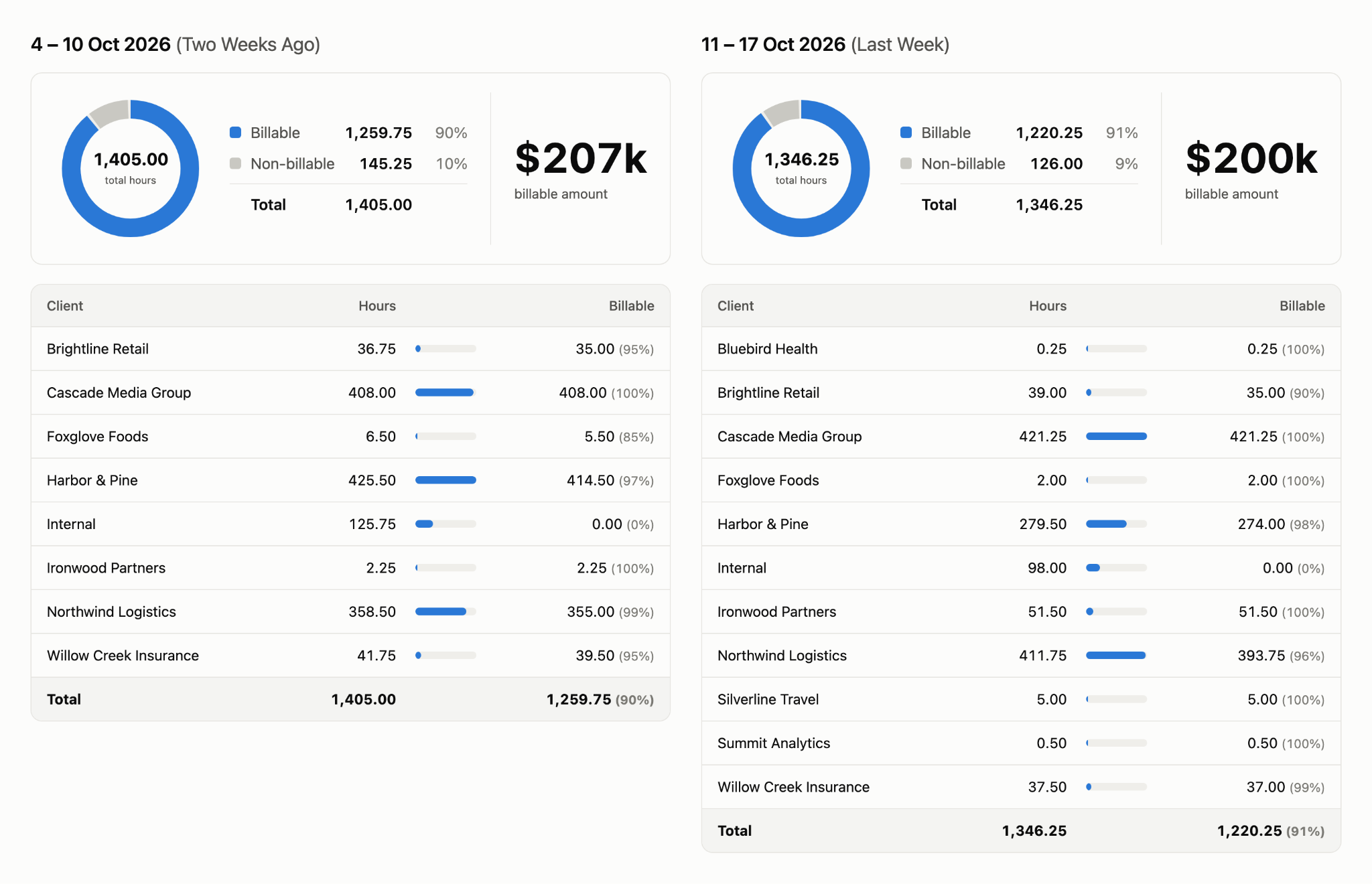
(It also only took a couple of minutes to get Claude to create a version of the report with all fake data so we could share it here.)
Creating this wasn’t a big deal, but it’s still a time saver. In the past we’d need to navigate through a UI to get to this report, take two different screenshots and crop them appropriately. Inevitably we’d snap a report for the wrong week or make some other minor mistake. What took a few minutes to do by hand now takes a few seconds. We just need to ask Claude to “create the business update report” and it’s done.
The tougher report to build is to support a weekly conversation we have about allocation of people and projects. It’s the combination of a retrospective: what happened last week and future: what’s happening in the coming weeks? Keito does a good job handling that second question with its planning features, but doesn’t provide great tools to assess how we did against the plan.
So we had Claude build an HTML page that helps us visualize and analyze the info we’re interested in – namely, how much (and why) reality diverged from the plan. Among other things, it includes:
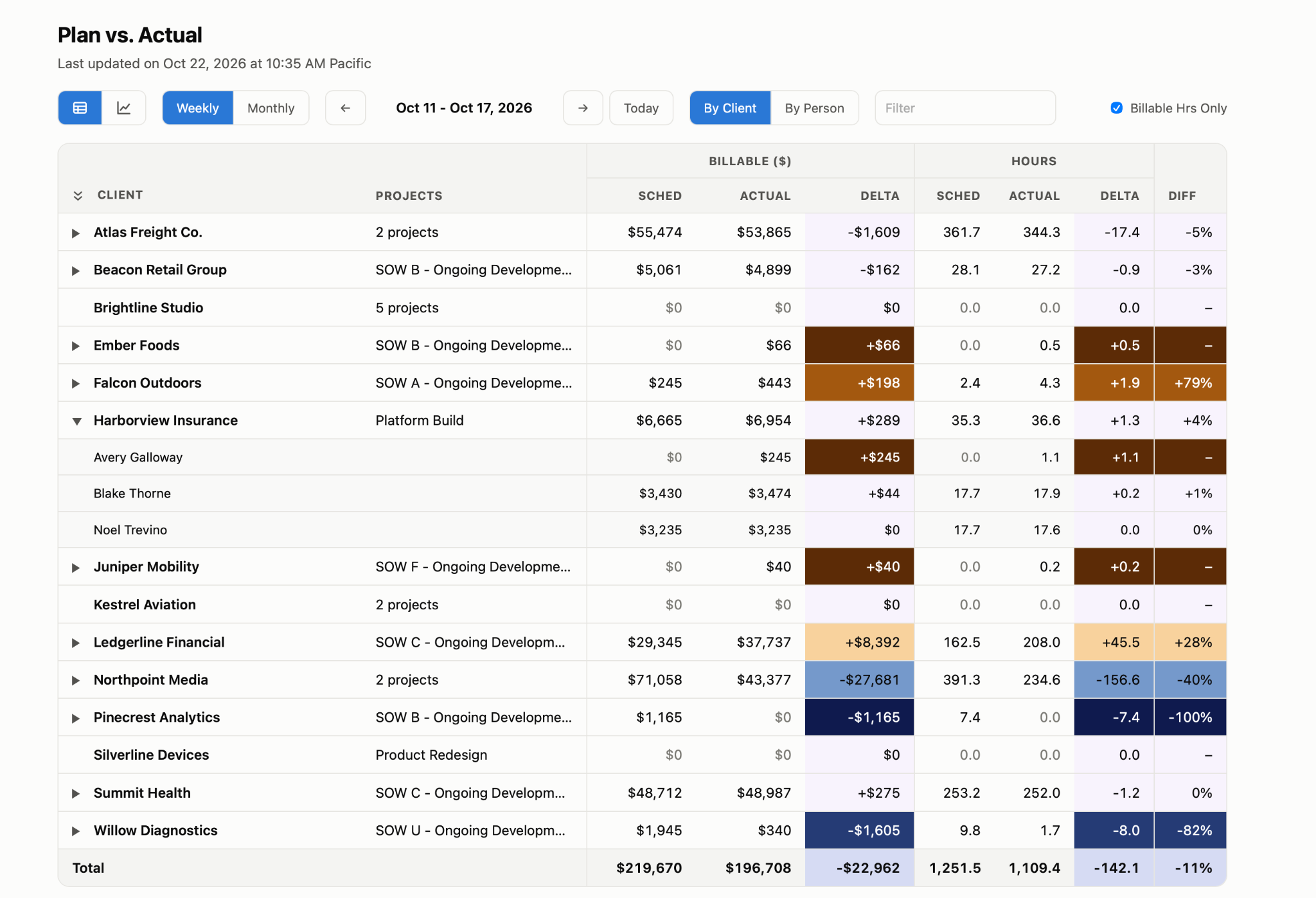
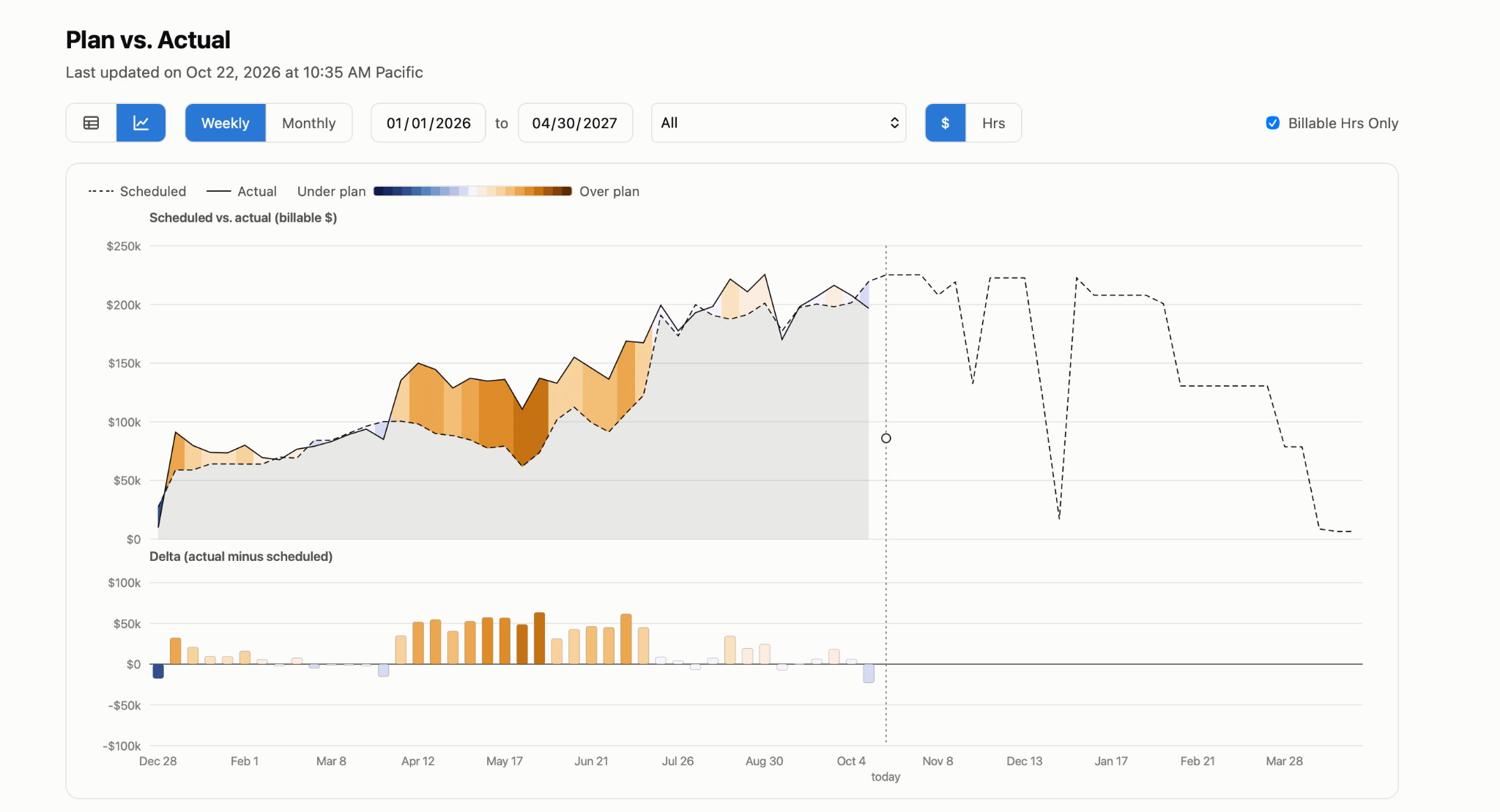
This took about 30 minutes to get an initial version ready, and a few hours of refinement to get it to where it is today (plus a few minutes to pump it full of fake data for these screenshots). The report is still a work in progress, but it has already cut down the length of our weekly allocation meeting and vastly improved our visibility into operations.
Just as important is what we didn't touch. We didn't build time tracking. We didn’t build invoicing. We didn’t build any data entry. We didn't build a QuickBooks integration.
Earlier in our career at RealPractice, we worked on a full platform that included time tracking, invoicing, and billing. So we know how much work goes into getting those things right. More importantly we know how little anyone notices when things just work and how loudly they complain when things go wrong. These core features have to just work, and someone else has already done the hard part.
Even though AI would make it easier to build it ourselves, doing that would come with opportunity cost and ongoing maintenance. Can we build a better mousetrap? Maybe. But not for less than the $199/mo we’re paying Keito to handle the core feature set, and we can instead focus our time and attention on just the parts that are specific to how we run Uptech Studio.
If you're weighing a tool decision like this, here's what we'd ask:
I suspect a lot of teams are about to rethink which tools they pay for and which ones they build on. If that's on your list, get in touch with us!

